
Meet Zoom AI Companion, your new AI assistant!
Boost productivity and team collaboration with Zoom AI Companion, available at no additional cost with eligible paid Zoom plans.
Quick answer
CCaaS meaning: CCaaS stands for contact center as a service, a cloud-based solution that powers customer support across voice, chat, SMS, and digital channels from a single system.
 11 min read
Updated on March 13, 2026
Published on March 13, 2026



Struggling to manage customer service with outdated systems is like navigating a city with a faulty GPS — every turn is frustrating, and every route feels like a dead end. Businesses across industries face this challenge, leading to slow responses, disjointed interactions, and declining customer satisfaction.
CCaaS is transforming how companies manage their contact centers by eliminating the need for costly on-premises infrastructure and offering a flexible, scalable way to improve service. And the numbers speak for themselves: The CCaaS market is forecasted to grow by $7.58 billion between 2024 and 2029 (a 19.4% CAGR), a clear indication of its growing importance.
Businesses that embrace CCaaS can streamline operations, automate tasks, and deliver consistent, responsive customer service. In this blog, we’ll dive into what CCaaS is, explore its key benefits, and outline the steps for effective implementation.
Contact center as a service is a cloud-based solution that enables businesses to manage customer service operations without relying on on-premises infrastructure. By leveraging the cloud, companies can avoid the costs and complexities associated with physical hardware while benefiting from a flexible, scalable service model.
CCaaS provides access to a range of tools and features like inbound and outbound calling, virtual chatbots, interactive voice response (IVR), automatic call distribution (ACD), chat, email, and social media integration. This approach reduces overhead costs and simplifies IT maintenance, allowing businesses to deliver efficient, high-quality customer service.
Traditional call centers depend on on-premises hardware and software, which means you face high upfront costs and ongoing maintenance for physical equipment. Upgrading or expanding your system — like adding more call stations or handling increased call volume — can be both slow and costly. You’ll also need IT support for repairs and updates, adding to the complexity.
In contrast, CCaaS operates entirely in the cloud, eliminating the need for costly physical infrastructure. You can quickly adjust your contact center’s capabilities to handle changes in call volume or customer demand without additional hardware investment. CCaaS also integrates easily with other business tools, offering a more flexible and efficient solution for managing customer interactions.
Unified communications as a service (UCaaS) and CCaaS both leverage cloud technology but serve different purposes. UCaaS focuses on integrating various communication tools such as voice, video, chat, and email into a single platform. It's designed to streamline internal communications and collaboration among team members, enabling a more cohesive and productive work environment.
In contrast, CCaaS is specifically designed to manage customer interactions and contact center operations. It offers features like advanced call routing, IVR systems, workforce engagement management, and omnichannel support to enhance the customer service experience.
|
UCaaS |
CCaaS |
|
Integrates internal communication tools like voice, video, chat, and email |
Manages customer interactions and contact center operations |
|
Enhances team collaboration and productivity |
Improves customer service with features like call routing and omnichannel support |
|
Used for internal communication among employees |
Used for external customer interactions and support |
|
Focuses on integrating internal communication channels |
Focuses on optimizing customer service delivery |
CCaaS offers several advantages that can transform how businesses manage their customer service operations. Let’s explore some of the key benefits, starting with cost savings.
CCaaS helps businesses save money by removing the need for on-premises infrastructure. Instead of investing in and maintaining expensive hardware, companies only pay for what they use through a subscription model. This approach also helps reduce the costs associated with IT maintenance and upgrades, enabling businesses to allocate resources more efficiently.
CCaaS enables businesses to scale their contact center operations up or down based on demand. Whether you need to handle a seasonal spike in customer inquiries or reduce capacity during quieter periods, CCaaS lets you adjust resources without additional hardware or lengthy implementation.
With cloud-based tools, you can easily add or remove agents, allocate tasks more efficiently, and optimize workflows to meet current needs. This flexibility means businesses can quickly adapt to changing customer demands and market conditions.
CCaaS improves the customer experience by enabling businesses to deliver faster, more efficient service. With AI-powered features such as automated call routing, omnichannel support, and real-time analytics, CCaaS connects customers to the right agent quickly, resolving their issues with minimal friction.
CCaaS also centralizes customer interactions across channels such as phone, email, chat, and social media, creating a seamless, consistent experience. With CCaaS technology, businesses can better meet customer expectations, leading to higher satisfaction and stronger loyalty.
CCaaS integrates seamlessly with your existing CRM software and business tools, streamlining customer service operations. With Zoom CX, for instance, you can embed call routing, web chat, video, and recordings directly into your compatible CRM customer journeys, simplifying interaction management.
By linking your telephony system, IVR, and automatic call distribution (ACD) with your CRM and databases, CCaaS provides readily accessible, up-to-date customer information. This integration enhances call routing efficiency and enables agents to provide more personalized, effective support within a unified platform.
CCaaS enables businesses to deliver an omnichannel experience by connecting customer interactions across multiple channels, such as phone, email, chat, and social media, into one agent interface. So, no matter how a customer chooses to reach out, their experience remains consistent and seamless.
With CCaaS, agents can access all customer communication history in one place, allowing them to respond more effectively and maintain context throughout the interaction. Whether a customer starts a conversation on social media and follows up via email or switches from chat to a phone call, CCaaS keeps everything integrated, helping businesses provide a smooth, unified customer experience.
CCaaS enhances the agent experience by enabling them to work from anywhere. The intuitive interfaces make it easier for agents to manage customer interactions across various channels, reducing the learning curve. Seamless access to customer data and integrated employee tools allows agents to focus on delivering top-notch service while staying connected to their organization, making their work more efficient and satisfying.
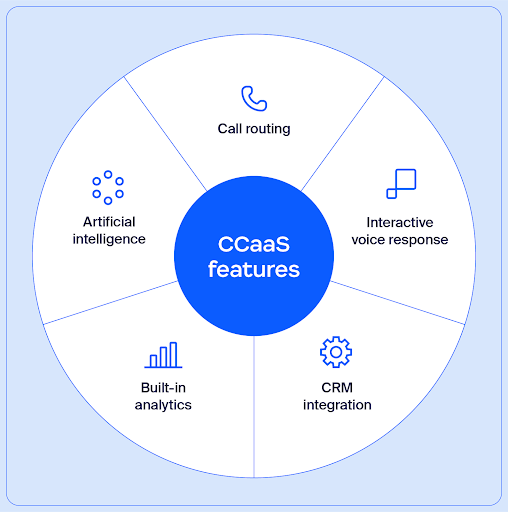
CCaaS offers a range of features that optimize customer service operations. These tools help enhance efficiency and improve customer interactions. Let’s explore some of the key features that make CCaaS a valuable solution for modern contact centers.
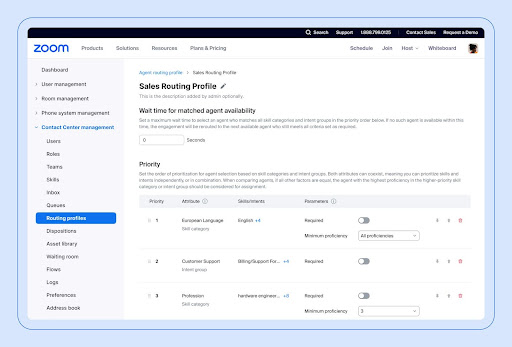
Call routing directs incoming calls to the most appropriate agent or department. Using customer data and advanced algorithms, CCaaS routes calls based on factors like agent availability and issue type. This leads to faster resolutions and a more personalized customer experience, connecting customers with the right person from the start.
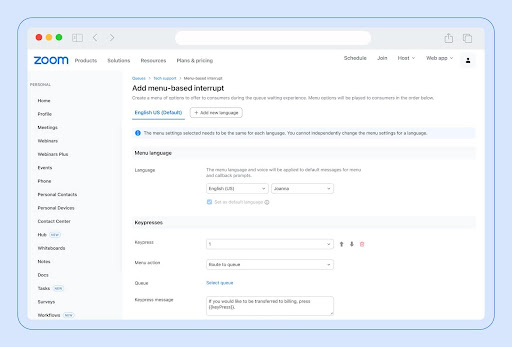
Interactive voice response helps automate call handling with pre-recorded messages and menus. It lets customers navigate options or get quick answers without speaking to an agent. This way, calls get directed to the right place faster, and agents can focus on more complex issues.
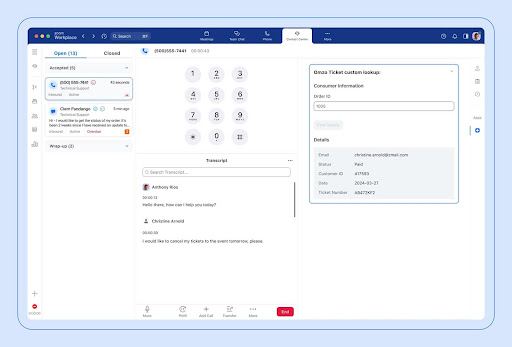
When CCaaS integrates with your CRM, it links customer interactions directly within it. This means customer records are updated automatically, and agents have access to interaction history during calls. This helps make interactions smoother and more personalized.
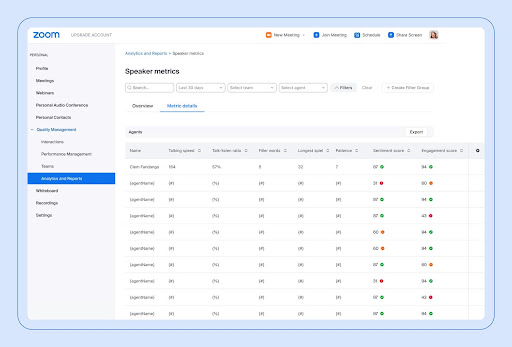
Many CCaaS solutions include built-in analytics that give you a real-time view of contact center performance. Beyond call volume and response times, they often provide quality management and interaction analytics for each conversation, including sentiment and key topics. This makes it easier to spot coaching opportunities, uncover recurring issues, and improve service quality using data rather than guesswork.
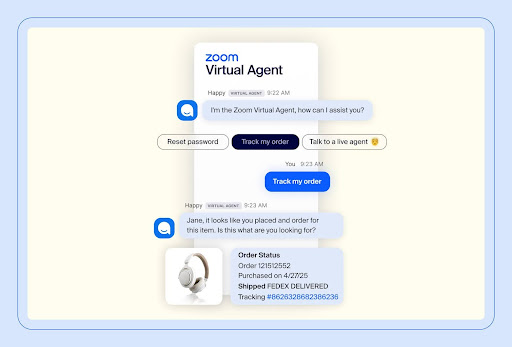
AI-powered features in CCaaS can handle routine tasks and provide advanced analytics. From virtual chatbots that answer common questions to predictive tools that help anticipate customer needs, AI helps make operations more efficient, empower agents, and enhance the customer experience.
AI also enables self-service automation through virtual agents that resolve common issues without agent involvement. This reduces wait times and deflects repetitive tickets. During live interactions, agent-assist tools provide real-time guidance, surface relevant knowledge, and suggest next steps, helping agents resolve issues faster.
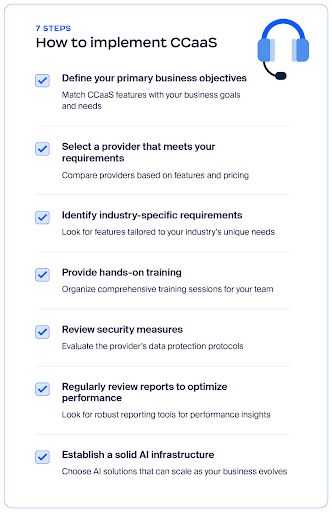
Implementing CCaaS involves maintaining a smooth transition from traditional systems. Follow these seven steps to learn how.
To successfully implement CCaaS, it’s crucial to align the solution with your business’s priorities. Start by identifying your main objectives, such as improving customer satisfaction or streamlining operations. Make sure the CCaaS features you choose support these goals and integrate well with your existing processes.
For example, if your priority is enhancing customer support efficiency, you’ll want to look for a CCaaS provider with strong analytics and call routing capabilities. This will address your specific needs, like reducing response times and improving service quality.
Evaluate providers based on their features, scalability, integration capabilities, and customer support. Consider factors such as ease of use, security measures, and cost to make sure the provider’s offering aligns with your business needs and goals.
For instance, if your business requires seamless integration with existing CRM tools and enhanced security, choose a provider that offers robust integrations and advanced encryption. This also helps you maintain data security while integrating with your current systems.
When selecting a CCaaS solution, focus on features that cater to your industry’s unique needs. Look for functionalities that address specific challenges, such as compliance monitoring, specialized reporting, or integration with industry-specific tools.
For example, a healthcare provider may choose a CCaaS solution that securely manages patient data and helps support the organization’s HIPAA compliance efforts through safeguards and contractual commitments.
Getting your agents up to speed with the new CCaaS system is crucial for a smooth transition. Make sure they receive hands-on training that covers the system’s features, how to navigate workflows, and best practices for using it. This helps your team get comfortable with the new tools and start using them effectively right away.
If your CCaaS has advanced call-routing features, hold training sessions where agents can practice using them. This way, they’ll feel confident handling customer interactions and making the most out of the new system.
When implementing a new CCaaS solution, it’s crucial to understand how the provider handles data security and privacy. Look into their security measures, such as encryption, and how they support your compliance with regulations to help protect your data. This helps mitigate potential issues early on and helps keep your customer information safe.
For instance, if you handle sensitive customer information, pick a provider that offers advanced encryption options. This way, you can feel confident that your data is secure and managed properly.
It’s important to examine the reporting and analytics features of your CCaaS solution. These tools provide valuable insights into performance metrics, helping you monitor key aspects like call volume and agent efficiency. Look for options that offer comprehensive data to help you make informed decisions and identify areas for improvement.
If your CCaaS solution provides detailed analytics on call trends and agent productivity, you can use this information to refine your strategies. For example, analyzing patterns in call wait times can guide adjustments in staffing or training to enhance overall performance.
AI plays a crucial role in modern CCaaS solutions, enabling smarter, more personalized customer interactions. By automating routine tasks like call routing and data collection, AI helps agents focus on higher-value work, improving overall efficiency. Choosing a provider with advanced AI capabilities like Automatic Call Distribution (ACD), Call recording, and a virtual agent to help your contact center adapt and grow with your business.
Choose a provider with advanced AI capabilities, such as ACD, call recording, and a virtual agent, to help your contact center adapt and grow with your business.
Zoom CX brings voice, chat, SMS, video, and virtual agents into a single AI-first contact center platform. With Zoom Virtual Agent built in, teams can automate self-service, route customers intelligently, and with Zoom AI Expert Assist, give agents real-time guidance during live conversations.
Because Zoom CX integrates with existing business tools and runs on Zoom’s robust infrastructure, it’s easy to deploy and scale as demand grows.
See how Zoom CX can help your business today.
Yes, CCaaS platforms offer advanced security measures such as end-to-end encryption, secure data storage, and regular updates, to help protect customer data and communications. Providers often adhere to industry standards and certifications to meet high-security requirements.
CCaaS is a cloud-based platform for managing customer interactions. It integrates various communication channels like voice, email, chat, and social media into a single secure system accessible from anywhere. This setup allows businesses to route, track, and manage customer interactions efficiently, with features such as call routing, automated responses, and real-time analytics.
CCaaS providers offer cloud-based contact center solutions. They deliver a range of services designed to manage customer interactions across multiple channels. Notable CCaaS providers include Zoom, Genesys, Five9, and Talkdesk, among others. These companies offer a range of features and integrations to meet the needs of different businesses.
Yes, CCaaS solutions are reliable, with many providers offering high uptime and robust performance. They are designed to deliver consistent service and support across various channels and locations.
Migrating from a legacy contact center to CCaaS usually happens in phases. Teams start by auditing current systems and workflows, then move core channels like voice and chat to the cloud while integrating existing CRMs and support tools. From there, teams often gradually add AI, automation, and analytics — minimizing downtime while giving agents time to adapt.








