Zoom Workplace How-to

The complete guide to meeting minutes (+ 3 templates and examples)

9 min read

Updated on March 13, 2026

Published on March 13, 2026

meeting minutes

Have you ever left a meeting and thought, “Wait, what exactly did we agree on?” 

Meeting minutes help turn that confusion into clarity, accountability, and action — without forcing everyone to rely on memory alone. In fact, we found that  60% of leaders attend three or more meetings in a day, which makes it especially easy for things to get confusing or lost in the shuffle. 

In this guide, we’ll walk you through what meeting minutes are, why they matter, and how to write them effectively. We’ve also included filled-in examples, blank templates, and practical tips to make your minutes clear and actionable.

What are meeting minutes?

Meeting minutes are the official written record of a meeting. They capture key details, such as who attended, the topics discussed, the decisions made, and any action items assigned. 

Essentially, they provide a clear and accurate summary of the discussion so that everyone — whether they were present or not — can understand what happened and what comes next.

Why are meeting minutes important?

Meeting minutes turn discussions into a clear record, helping teams stay aligned and avoid misunderstandings. They make it easy to reference decisions and action items after a meeting, keeping everyone on the same page. Here’s how:

  • Alignment: Teams can quickly check what was discussed and agreed on, reducing confusion after the meeting
  • Accountability: Documented decisions and action items make it clear who is responsible for each task
  • Documentation: Minutes provide a neutral record of discussions and decisions that can be referenced if disputes arise
  • Meeting efficiency: A clear record of past discussions prevents repeating topics and keeps future meetings focused

Progress tracking: Teams can track completed action items and follow project developments over time

What to include in meeting minutes

Good meeting minutes capture everything you need to keep your team on the same page so that nothing slips through the cracks. Here’s what to include in a standard set:

  • Basic details: Date, start and end time, where the meeting took place (or Zoom link), and what kind of meeting it was (project kickoff, status update)
  • Attendance: Who showed up and who couldn’t make it
  • Meeting agenda items: The topics you covered during the meeting
  • Discussion points: Key points that came up, agreements reached, and any differing opinions
  • Decisions made: What was decided, why, and who signed off
  • Action items: Tasks, who’s responsible for each, deadlines, and any extra notes

Open items: Things that need more discussion or follow-up next time

Meeting minutes templates + examples

Having a clear template can make writing meeting minutes much easier and more consistent. 

Below, we’ve put together three different meeting notes templates with examples to show how you can capture key information, track decisions, and assign action items efficiently. Use these templates as a starting point and adapt them to fit your team’s workflow.

  1. Zoom meeting minutes template


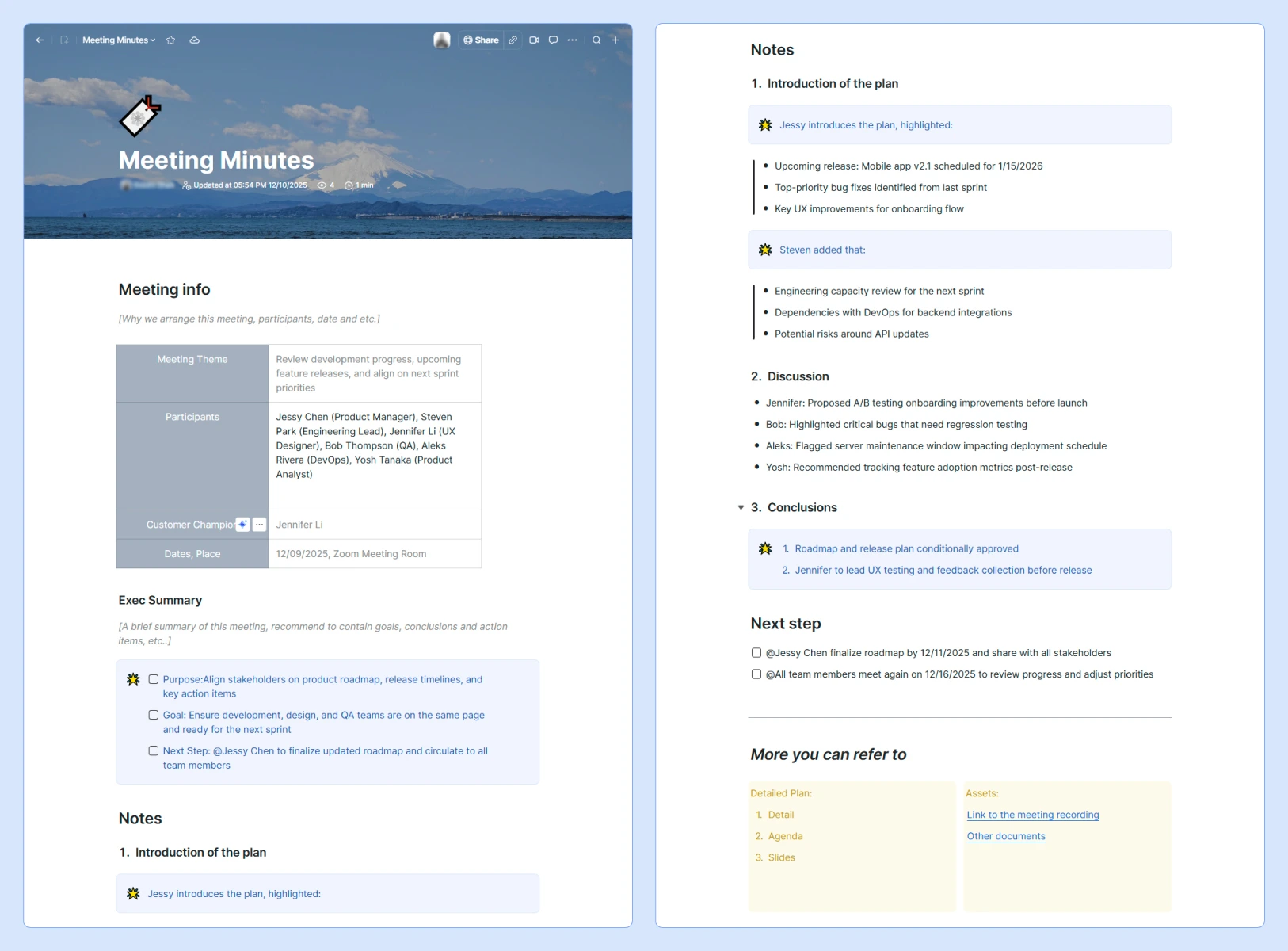
    Zoom’s meeting minutes template is built to capture everything your team needs from start to finish, helping to keep meetings organized and actionable. Here’s what it does well:

    • Meeting info: Provides space to document the purpose, participants, and date and location, so everyone knows why the meeting is happening and who should be involved
    • Meeting theme: Clearly identifies the focus or topic of the meeting for quick reference
    • Participants and customer champion: Tracks attendees and key stakeholders, making accountability clear
    • Exec summary: Offers a section for a concise overview of goals, conclusions, and next steps
    • Purpose, goal, next step: Highlights what the meeting aims to achieve and the actions needed afterward
    • Notes sections: Organizes content into structured segments — introduction, discussion points, and conclusions — so important insights don’t get lost
    • Discussion tracking: Separates contributions by participants to capture perspectives and key points
    • Conclusions: Summarizes decisions, approvals, and assignments to create clarity
    Next steps/follow-up: Provides clear responsibility and deadlines for action items and schedules follow-up alignment
  2. Project kickoff meeting minutes template


    This
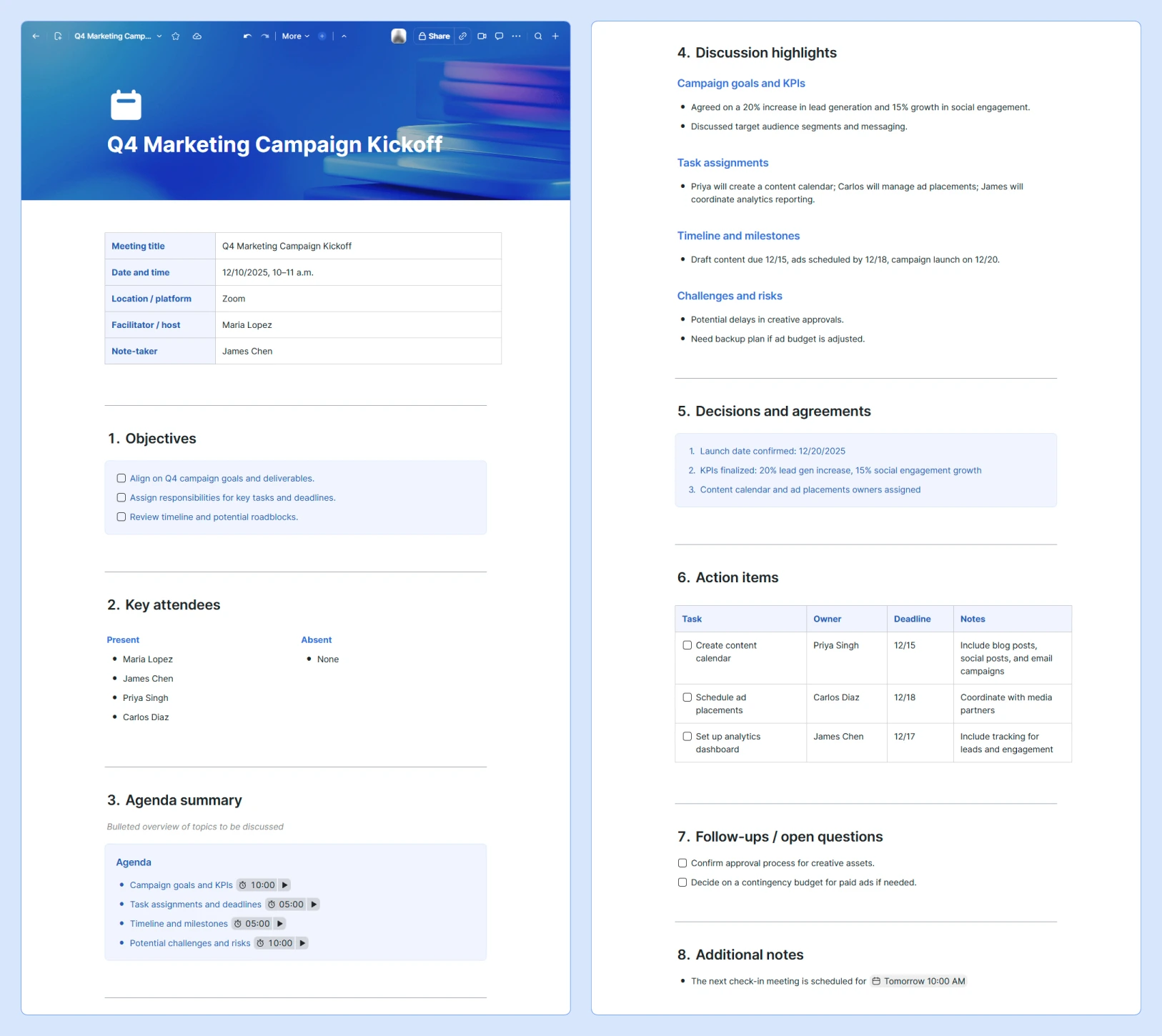
    comprehensive meeting minutes template is designed to capture everything you need before you start working on a project without feeling overwhelmed. Here’s why it works:

    • Objectives: Outlines the main goals of the meeting so everyone knows what to focus on
    • Key attendees: Tracks who’s in the meeting and who’s missing
    • Agenda summary: Gives a quick snapshot of the topics being discussed
    • Discussion highlights: Summarizes important points, agreements, and differing opinions
    • Decisions and agreements: Captures what was decided, why, and who signed off
    • Action items: Assigns tasks with owners, deadlines, and any extra notes so follow-up is easy
    • Follow-ups/open questions: Notes anything that needs more discussion or clarification next time
    Additional notes: Provides space for anything else that’s worth documenting but doesn’t fit elsewhere

  3. Quick check-in meeting minutes template


    This
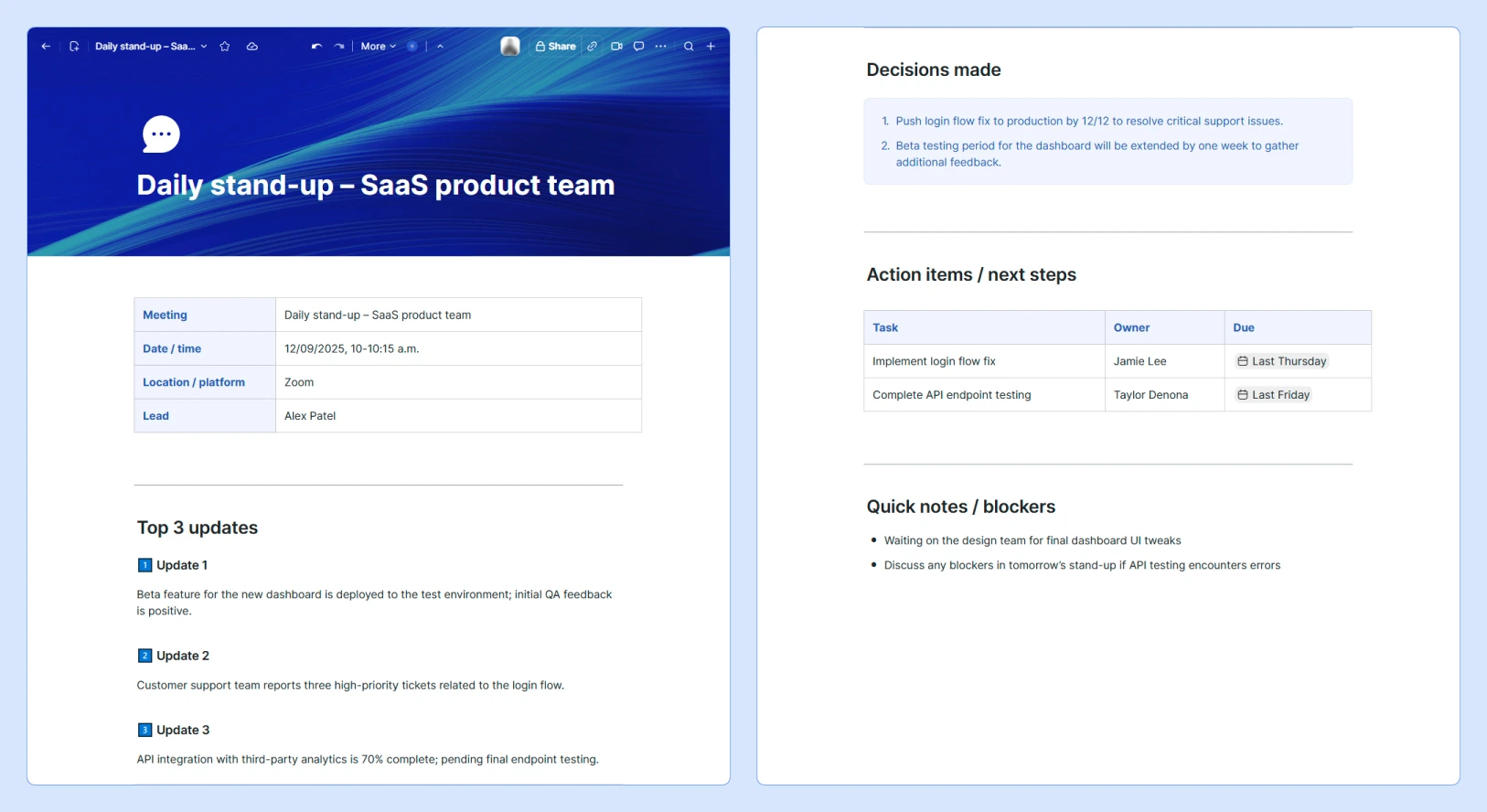
    quick check-in template is designed for short, focused meetings. It helps teams capture only the most essential information and keeps notes easy to reference. Key components and benefits include:

    • Top updates: Focuses on the three most important points from the meeting
    • Decisions made: Clearly lists any decisions to keep everyone aligned
    • Action items: Assigns tasks with owners and deadlines for fast follow-up
    • Quick notes/blockers: Captures issues or items to revisit without adding unnecessary detail
    Efficiency: Keeps notes brief and easy to scan, saving time for both the note-taker and the team

8 tips for writing meeting minutes

Writing clear and actionable meeting minutes doesn’t have to be complicated. These tips can help you learn how to write meeting minutes efficiently and make your notes useful for everyone on the team.

1. Prepare ahead of the meeting

Review the agenda and any relevant documents before the meeting starts. Knowing the topics and expected outcomes helps you focus on what’s important and sets you up to capture decisions and action items accurately.

2. Use a structured template

A structured template keeps your notes organized and speeds up the writing process. Using a consistent format, like Zoom’s meeting minutes templates, can make it easier for anyone to follow along and reference the notes later.

3. Leverage automation for note-taking

Automated tools can capture key details, summaries, and action items as the meeting happens. Zoom’s AI note-taker, for example, can help you generate meeting minutes faster while maintaining accuracy and capturing key details.

4. Capture only what matters

Focus on the most important points: decisions, action items, and major discussion topics. Avoid including side conversations or word-for-word quotes so that your minutes remain concise and easy to reference.

5. Document decisions and action items precisely

Be clear about what was decided, who is responsible, and any deadlines. Specificity helps everyone follow through and prevents confusion later.

6. Clarify in real time

If something is unclear during the meeting, ask questions immediately. Confirm key points as they happen so your notes accurately reflect what was discussed.

7. Share the meeting minutes quickly

Distribute your minutes as soon as you’re done reviewing and refining them. Quick sharing keeps everyone on the same page and makes it easier to act on decisions while the discussion is still fresh.

8. Keep your meeting minutes organized in a central location

Store all meeting minutes in a single, accessible location, such as our meeting minutes catalog or index document. This central repository can make it easy for team members to search past meetings, track progress, and reference decisions. 

Our catalog also offers features like tagging, filtering, and quick navigation to help you find specific minutes or action items without digging through multiple files.


Build better meeting minutes with Zoom

With the right structure, meeting minutes can turn any discussion into a clear record of decisions, action items, and next steps. Using templates and examples like the ones above can make it easier to stay organized and keep your team aligned. 

Zoom AI Companion can help you create accurate, comprehensive meeting minutes faster by automatically capturing discussions, decisions, and tasks. You can also tap into other Zoom Workplace tools — like collaborative whiteboards, screen sharing, and shared Docs — to help keep everyone aligned and make your meetings feel more interactive and action-driven. 

Discover how AI Companion can simplify your workflow and give your team more time to focus on what matters most.

Our customers love us

Okta
Nasdaq
Rakuten
Logitech
Western Union
Autodesk
Dropbox
Okta
Nasdaq
Rakuten
Logitech
Western Union
Autodesk
Dropbox

Zoom - One Platform to Connect