
새로운 AI 어시스턴트인 Zoom AI Companion을 만나 보세요!
적격 유료 Zoom 요금제를 이용 중이라면 추가 비용 없이 사용 가능한 Zoom AI Companion으로 생산성을 높이고 팀 협업을 강화해 보세요.
 8 분 읽기 분량
게시 날짜 2024년 7월 16일



| What does VoIP stand for? VoIP is short for Voice over Internet Protocol. You might hear it called Voice over IP, but both terms mean the same thing — calls made over the internet instead of phone lines. |
The shift away from old-school phone lines has opened the door to faster, smarter ways to stay in touch. Voice over Internet Protocol (VoIP) routes calls over the internet, giving you clearer audio, flexible setup options, and features that traditional systems struggle to match.
Adoption continues to accelerate — the latest VoIP statistics reveal that by 2034, the U.S. VoIP market is expected to reach nearly $152 billion, with the global market projected to hit $415.2 billion.
In this article, you’ll get a quick, practical look at what VoIP is, how it works, and the advantages and tradeoffs to keep in mind. We'll also cover the features that help teams communicate more efficiently.
VoIP is a technology that lets you make phone calls using the internet instead of traditional phone lines.
Unlike regular phones, which rely on physical wires, VoIP converts your voice into digital data and sends it over the internet to the person you’re calling. It works similarly to sending an email but transmits your voice instead of text.
In a VoIP setup, the organization typically manages and maintains its own VoIP system, such as Zoom Phone, which includes the necessary hardware, software, and infrastructure. This approach can reduce costs while giving teams more flexibility in how they communicate.
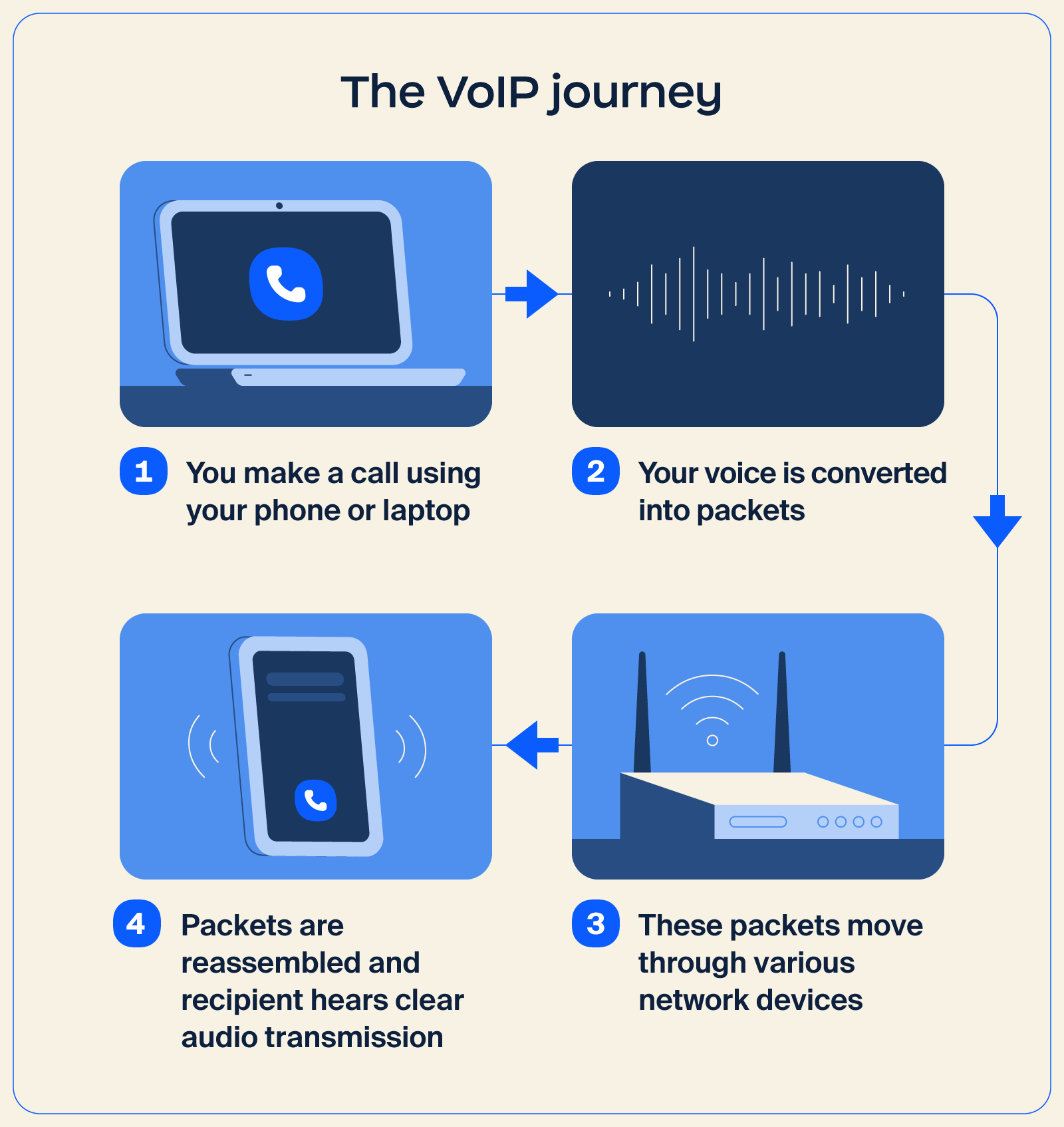
The voice calls you make over Wi-Fi or mobile data are a simple example of VoIP in action. While many apps use this approach for personal communication, the same concept extends for professional use through an IP phone system.
Solutions like Zoom Phone use VoIP technology to provide reliable calling, business numbers, call routing, and other features that help your business manage call workflows more efficiently.
Here’s how VoIP works behind the scenes:
VoIP can transform your business communication by replacing fixed phone lines with an internet-based system that’s easier to scale, manage, and adapt. This is especially useful for teams that want a flexible setup or use a Bring Your Own Carrier (BYOC) approach, since everything runs on a cloud-based foundation.
There are also a few tradeoffs to consider, particularly surrounding connection quality. Here’s a closer look at both sides:
| Pros | Cons |
|
|
If your team wants modern calling features, simpler management, and room to grow, VoIP offers a strong foundation. Teams see the strongest results when VoIP is paired with a stable internet connection and a provider that fits their workflow.
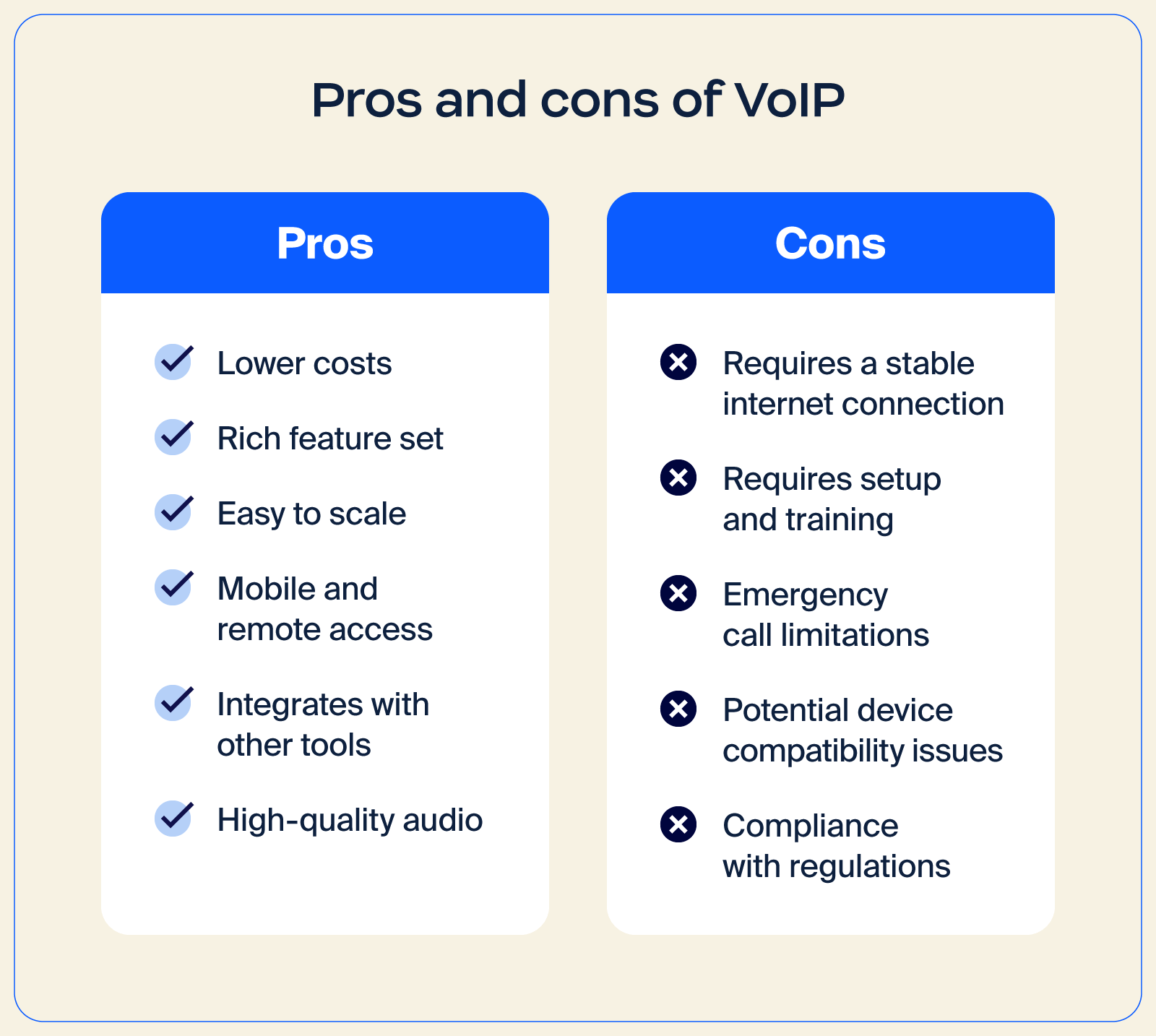
VoIP는 수많은 이점을 제공하지만, 몇 가지 단점과 제한 사항도 있습니다. 여러분이 겪을 수 있는 몇 가지 문제를 살펴보겠습니다.
귀사의 모든 커뮤니케이션 요구 사항을 충족하는 VoIP 전화 시스템을 찾고 계신가요? 다음은 비즈니스 커뮤니케이션을 더 원활하게 만들어 줄 수 있는 몇 가지 기능입니다.
Imagine having all your communication tools in one place. With unified communications, you get seamless integration of meetings, phone, and Zoom Chat. It’s like having a supercharged command center for your team’s collaboration efforts.
부재중 통화는 이제 잊고 가상 접수 교환원을 이용하세요. 가상 접수 교환원은 발신자를 전문적 태도로 맞이하고 적절한 담당자나 부서로 연결해 줍니다. 연중무휴 24시간 통화를 관리하고 고객을 필요한 서비스로 라우팅하는 유용한 도우미입니다.
데스크톱과 모바일 호환성을 통해 이동 중에도 연결 상태를 유지하세요. 사무실에 있든 외부에 있든 호환되는 모든 기기에서 VoIP 전화 시스템에 액세스할 수 있으므로 중요한 통화를 놓칠 일이 없습니다.
암호화와 강력한 보안 조치로 민감한 커뮤니케이션을 보호하세요. 이는 통화를 위한 안전한 금고와 같은 기능을 하는 것으로, 대화를 비공개 및 기밀로 유지합니다.
직접 대면하여 대화하는 듯한 선명한 통화 품질을 경험하세요. 고품질 오디오를 사용하면 선명한 음질로 자신 있게 소통할 수 있어 모든 대화가 수월해집니다.
Zoom Phone의 포괄적인 통화 기능을 이용하면 어떤 불편함도 감수할 필요 없이 유연한 모바일 클라우드 전화 시스템의 장점을 누릴 수 있습니다. 또한, 원활한 통합으로 워크플로를 간소화하고, 통화 후 요약 및 음성 메일 작업 추출과 같은 AI 기반 도구로 생산성을 높이며, HD 음질로 선명한 커뮤니케이션을 경험할 수 있습니다.
여기에 통화 녹음, 음성 메일 대화 내용, 모바일 앱 액세스 등의 기능도 제공되어 비즈니스 커뮤니케이션을 처리하기가 그 어느 때보다 쉬워집니다.
VoIP and traditional landlines both handle business calling, but they work in very different ways. VoIP runs over the internet, making it easier to scale and manage, and is typically packed with features that help teams in today’s workplace communicate more efficiently.
Landlines rely on physical phone lines, which limit flexibility and make it harder to support modern workflows. Additional differences include:
| Category | VoIP | Landlines |
| Startup cost | Usually lower, especially for teams already using cloud tools App download is free; optional adapter cost: $20-$50 |
Can be higher due to hardware ($50-$100) and on-site phone installation ($40-$100) |
| Monthly fees | Often more predictable and budget-friendly Per user estimate: $15-$40 + taxes/fees |
Can increase with long-distance and maintenance charges Per line estimate: $20-$60 + taxes/fees |
| Call quality | High quality with a stable connection | Consistent, backed by physical infrastructure |
| International calls | More affordable — lower per-minute rates, often in cents | Higher rates — $1+ |
| Features | Rich capabilities, including call routing, voicemail transcription, and video options | Limited features |
| Unified communications | Can support meetings, phone, and chat in one place | Not designed for integrated communication |
| Security | Enterprise-grade security and protection are normally built in | Dependent on carrier systems |
| Other considerations | Easily scalable and adaptable to changing needs | Less flexible and harder to expand |
All in all, VoIP stands out for businesses that want a flexible IP phone system with modern workplace features. Landlines still offer steady reliability, but they lack the flexibility, speed, and range of capabilities that VoIP platforms offer for everyday communication.
유연한 업무 모델을 설계할 때는 팀의 연결성을 강화하고 물리적 분리로 인한 거리를 좁히는 것이 중요합니다. 즉, 적절한 커뮤니케이션 소프트웨어를 활용하는 것이 중요합니다. 사실 미국에서는 기존의 유선 전화가 점차 없어지고 있는 추세입니다. 따라서 지금 VoIP로 전환하는 것을 고려하는 것이 현명한 선택입니다.
클라우드 기반 VoIP 전화 서비스인 Zoom Phone은 데스크톱과 모바일 장치에서 전화, 채팅, 회의 등을 위한 통합 플랫폼으로 워크플로우를 최적화합니다. 또한 통화 후 요약, 음성 메일 작업 추출, 음성 메일 우선순위 지정 등을 비롯한 AI 기반 기능을 통해 워크플로우를 간소화하고, 작업 우선순위를 지정하며, 커뮤니케이션 관리를 개선할 수 있습니다.
Zoom Phone은 AI 우선 협업 플랫폼인 Zoom Workplace의 다른 도구와도 통합됩니다. 지금 바로 Zoom에 연락하여 Zoom Phone이 비즈니스 연결성과 협업을 어떻게 혁신할 수 있는지 알아보세요.
VoIP에 관해 여전히 궁금한 점이 있으신가요? 답변해 드리겠습니다! 몇 가지 일반적인 질문을 자세히 살펴보겠습니다.
VoIP의 비용은 서비스 공급자, 기능, 사용자 수 등의 요인에 따라 달라집니다. 일반적으로 VoIP는 월 사용료가 저렴하고 장거리 요금이 절감되어 기존 전화 서비스보다 비용을 절약할 수 있습니다. 그러나 장비 및 인프라를 설치하기 위한 초기 비용이 발생할 수 있습니다.
예, 많은 휴대폰에서 Zoom Workplace와 같은 앱을 통해 VoIP를 음성 통신에 사용할 수 있습니다. 휴대폰이 Wi-Fi에 연결되면 이러한 앱은 기존 셀룰러 네트워크 대신 인터넷을 통해 전화를 걸 수 있는 VoIP 기술을 활용하여 비용 절감을 제공할 수 있고 향상된 기능을 선사합니다.
대부분의 경우 그렇습니다! VoIP 공급자는 일반적으로 번호 포팅 서비스를 제공하여 기존 전화번호를 VoIP 시스템으로 이전할 수 있도록 합니다. 즉, 익숙한 전화번호를 그대로 사용하면서 VoIP의 혜택을 누릴 수 있습니다. 마찬가지로, Skype 번호로 이전할 때 이 기능을 사용하면 기존 연락처를 편리하게 그대로 사용할 수 있습니다. 이는 개인적인 연락이나 업무상 연락의 연속성을 보장하는 데 매우 중요합니다.
VoIP 보안 조치는 서비스 공급자와 구현 방식에 따라 달라질 수 있습니다. VoIP는 통신을 보호하기 위한 암호화 및 보안 기능을 제공하지만, 소프트웨어를 최신 상태로 유지하는 등의 모범 사례를 실천하는 것이 중요합니다.








