
Meet Zoom AI Companion, your new AI assistant!
Boost productivity and team collaboration with Zoom AI Companion, available at no additional cost with eligible paid Zoom plans.
 8 min read
Updated on March 04, 2026
Published on March 04, 2026



| What does VoIP stand for? VoIP is short for Voice over Internet Protocol. You might hear it called Voice over IP, but both terms mean the same thing — calls made over the internet instead of phone lines. |
The shift away from old-school phone lines has opened the door to faster, smarter ways to stay in touch. Voice over Internet Protocol (VoIP) routes calls over the internet, giving you clearer audio, flexible setup options, and features that traditional systems struggle to match.
Adoption continues to accelerate — the latest VoIP statistics reveal that by 2034, the U.S. VoIP market is expected to reach nearly $152 billion, with the global market projected to hit $415.2 billion.
In this article, you’ll get a quick, practical look at what VoIP is, how it works, and the advantages and tradeoffs to keep in mind. We'll also cover the features that help teams communicate more efficiently.
VoIP is a technology that lets you make phone calls using the internet instead of traditional phone lines.
Unlike regular phones, which rely on physical wires, VoIP converts your voice into digital data and sends it over the internet to the person you’re calling. It works similarly to sending an email but transmits your voice instead of text.
In a VoIP setup, the organization typically manages and maintains its own VoIP system, such as Zoom Phone, which includes the necessary hardware, software, and infrastructure. This approach can reduce costs while giving teams more flexibility in how they communicate.
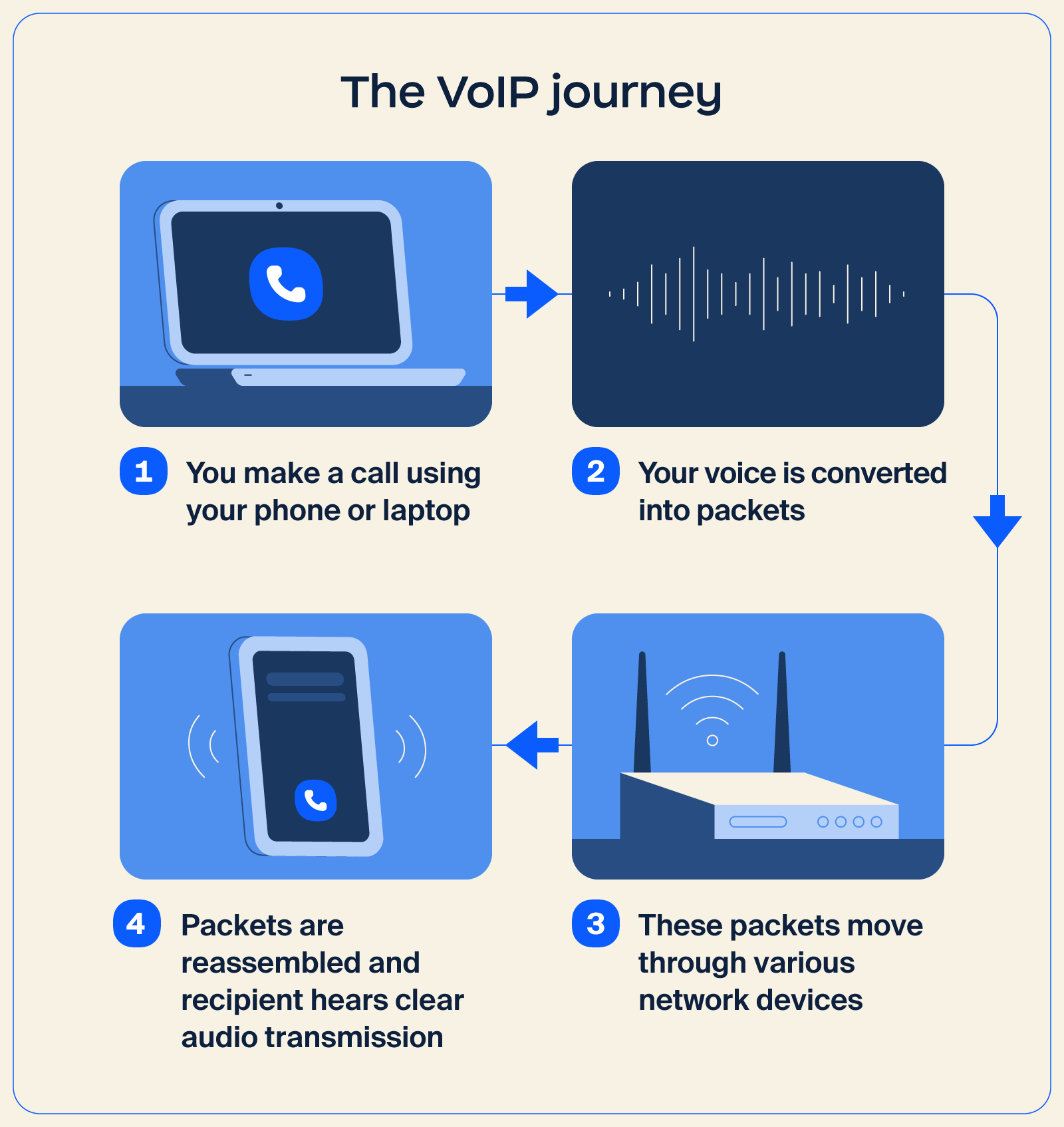
The voice calls you make over Wi-Fi or mobile data are a simple example of VoIP in action. While many apps use this approach for personal communication, the same concept extends for professional use through an IP phone system.
Solutions like Zoom Phone use VoIP technology to provide reliable calling, business numbers, call routing, and other features that help your business manage call workflows more efficiently.
Here’s how VoIP works behind the scenes:
VoIP and traditional landlines both handle business calling, but they work in very different ways. VoIP runs over the internet, making it easier to scale and manage, and is typically packed with features that help teams in today’s workplace communicate more efficiently.
Landlines rely on physical phone lines, which limit flexibility and make it harder to support modern workflows. Additional differences include:
| Category | VoIP | Landlines |
| Startup cost | Usually lower, especially for teams already using cloud tools App download is free; optional adapter cost: $20-$50 |
Can be higher due to hardware ($50-$100) and on-site phone installation ($40-$100) |
| Monthly fees | Often more predictable and budget-friendly Per user estimate: $15-$40 + taxes/fees |
Can increase with long-distance and maintenance charges Per line estimate: $20-$60 + taxes/fees |
| Call quality | High quality with a stable connection | Consistent, backed by physical infrastructure |
| International calls | More affordable — lower per-minute rates, often in cents | Higher rates — $1+ |
| Features | Rich capabilities, including call routing, voicemail transcription, and video options | Limited features |
| Unified communications | Can support meetings, phone, and chat in one place | Not designed for integrated communication |
| Security | Enterprise-grade security and protection are normally built in | Dependent on carrier systems |
| Other considerations | Easily scalable and adaptable to changing needs | Less flexible and harder to expand |
All in all, VoIP stands out for businesses that want a flexible IP phone system with modern workplace features. Landlines still offer steady reliability, but they lack the flexibility, speed, and range of capabilities that VoIP platforms offer for everyday communication.
Looking for a VoIP phone system that meets all your communication needs? Here are some features that can make your business communication easier:
Imagine having all your communication tools in one place. With unified communications, you get seamless integration of meetings, phone, and Zoom Chat. It’s like having a supercharged command center for your team’s collaboration efforts.
Say goodbye to missed calls and hello to a virtual receptionist who greets your callers professionally and directs them to the right person or department. It’s a helpful assistant managing your calls 24/7, routing customers to the services they need.
Stay connected on the go with desktop and mobile compatibility. Whether you’re at your desk or out and about, you can access your VoIP phone system from any compatible device, so you don’t miss important calls.
Protect your sensitive communications with encryption and robust security measures. It’s like a secure vault for your calls, keeping your conversations private and confidential.
Experience crystal-clear call quality that sounds like you’re talking face-to-face. With high-definition audio, you can communicate with clarity and confidence, making every conversation a breeze.
With Zoom Phone’s comprehensive suite of calling features, you can enjoy the benefits of a flexible and mobile cloud phone system without compromise. You can even streamline your workflows with seamless integrations, enhance productivity with AI-driven tools like post-call summaries and voicemail task extraction, and experience crystal clear communications with HD voice quality.
Plus, with features like call recording, voicemail transcription, and mobile app access, managing your business communications has never been easier.
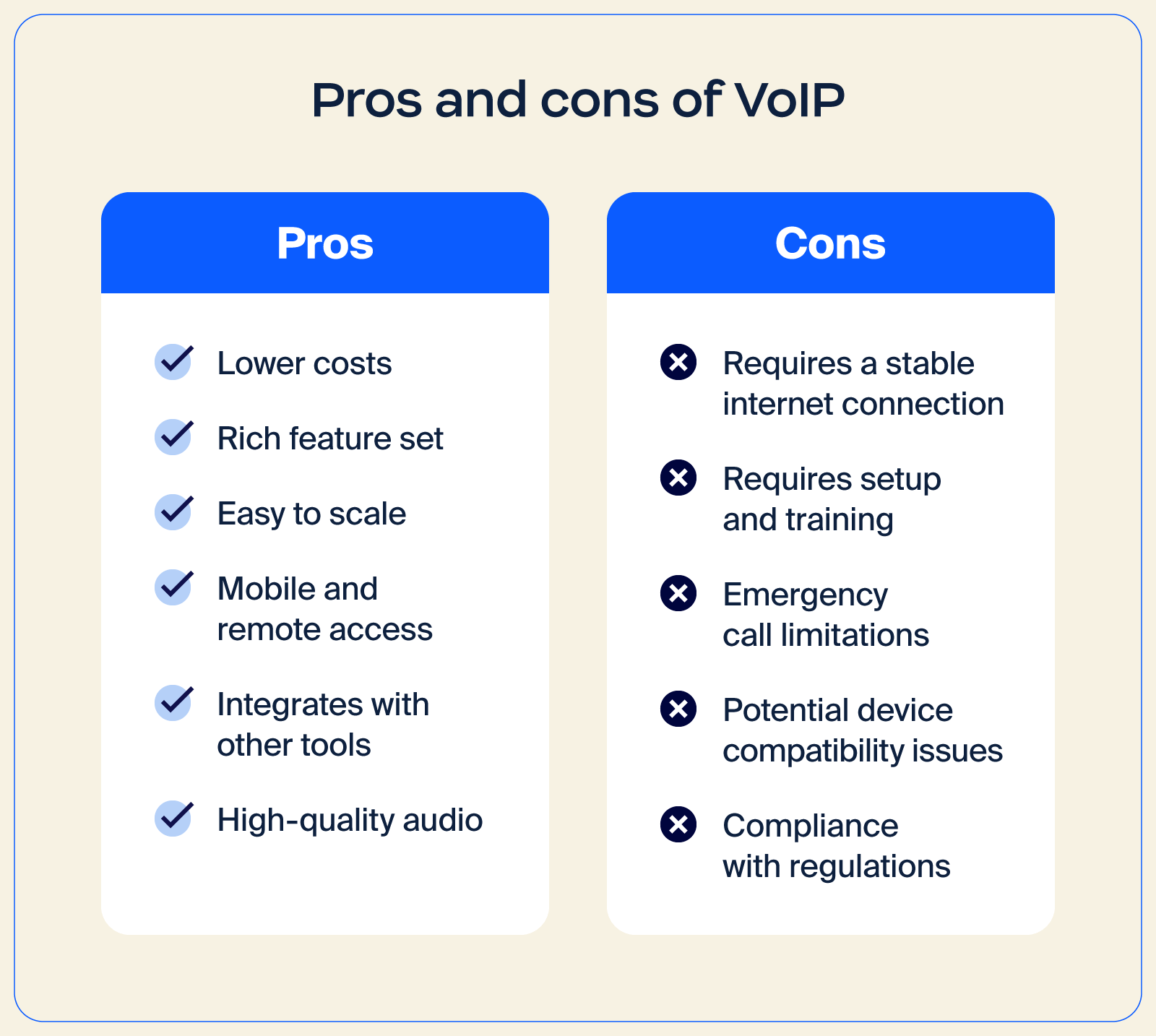
VoIP can transform your business communication by replacing fixed phone lines with an internet-based system that’s easier to scale, manage, and adapt. This is especially useful for teams that want a flexible setup or use a Bring Your Own Carrier (BYOC) approach, since everything runs on a cloud-based foundation.
There are also a few tradeoffs to consider, particularly surrounding connection quality. Here’s a closer look at both sides:
| Pros | Cons |
|
|
If your team wants modern calling features, simpler management, and room to grow, VoIP offers a strong foundation. Teams see the strongest results when VoIP is paired with a stable internet connection and a provider that fits their workflow.
Zoom Phone can make communication a breeze, letting you manage everything from a single admin portal. It is designed to help you optimize workflows for phone, chat, meetings, and more, powered by AI across desktop and mobile devices.
Additionally, Zoom Phone’s AI-first features, including post-call summaries, voicemail task extraction, and voicemail prioritization, can help you stay focused and respond faster. It can also integrate with other tools in Zoom Workplace, an AI-first collaboration platform.
Zoom Workplace enhances teamwork by streamlining communication, boosting productivity, and optimizing in-person interactions. It includes tools for video conferencing, chat, scheduling, virtual whiteboarding, and more, all designed to improve modern work experiences and employee engagement.
Reach out today to see how Zoom Phone can transform your business’s connectivity and collaboration.
Moving to VoIP is straightforward when you break the process into clear stages. You’ll plan your needs, check your connection, choose a provider, gather any equipment, and finish setup with onboarding.
If you’ve ever spotted jitter on a speed test, you know the internet plays a role in call quality, so preparing your network early will help you get the most out of your IP voice setup.
Start by mapping out how your team communicates. Look at call volume, remote work expectations, the tools you already use, and any security rules that apply. For example, healthcare organizations that are subject to HIPAA regulations may look for a , VoIP provider that offers features such as encrypted calling and controlled access to call records.
Next, create a clear budget. VoIP pricing varies, but you can expect averages like:
Use these estimates to compare the investment with potential gains. Many organizations see measurable cost and infrastructure improvements after switching to VoIP. For instance, Flex reduced 50%-70% of circuits and infrastructure worldwide and lowered total cost of ownership by moving to Zoom Phone.
Run a bandwidth test to see if your connection can support VoIP. You want a stable link with roughly 100 Kbps per user, delivered over fiber or coaxial internet for the most reliable performance.
If your current setup falls short, consider a small upgrade. A newer router, stronger Wi-Fi, or a different ISP help reduce dropped calls and minimize jitter during conversations.
A good VoIP provider should support how your business operates today while leaving room to grow. As you compare options, look for:
Also check for mobile app support, international calling options, and any regional limits. With Zoom Phone, you get a flexible cloud phone system built for mobility, along with helpful integrations, AI-first productivity tools, and HD voice quality. Additional VoIP phone features, such as call recording, voicemail transcription, and mobile access, can make day-to-day communication easier to manage.
Once you choose your provider, gather what you need for smooth onboarding, including:
Your provider will guide you through onboarding, which usually includes a quick walkthrough of features and user training. If you’re keeping your existing number, they’ll handle number porting. If not, you can share a new number across your website, email signatures, and customer channels.
Once everything’s connected, your team can make and receive calls with your new VoIP system and transition into daily use with minimal disruption.
If you’re still curious about what VoIP is and how it works, these answers address common questions and cover the essentials.
Most VoIP plans run about $10-$30 per user each month. For example, Zoom Phone starts at $10 per month per user, with costs increasing if you add equipment or extra features.
Yes, many cell phones can use VoIP for voice communication with apps like Zoom Workplace. When a cell phone is connected to Wi-Fi, these apps use VoIP to make calls over the Internet rather than traditional cellular networks, which can reduce costs and expand calling features.
Yes, most providers support number porting, so you can move your existing phone number to your new VoIP system and keep everything familiar as you switch platforms.
Yes, VoIP can offer stronger protection through enterprise-grade security features and modern access controls when providers apply current security practices.








